Download Pinterest images and videos in bulk, most-saved first
Search a keyword or paste a board link. Pindownloader ranks the pins by repins and saves the best ones to your computer, whether they are images, videos or gifs, with file names you choose.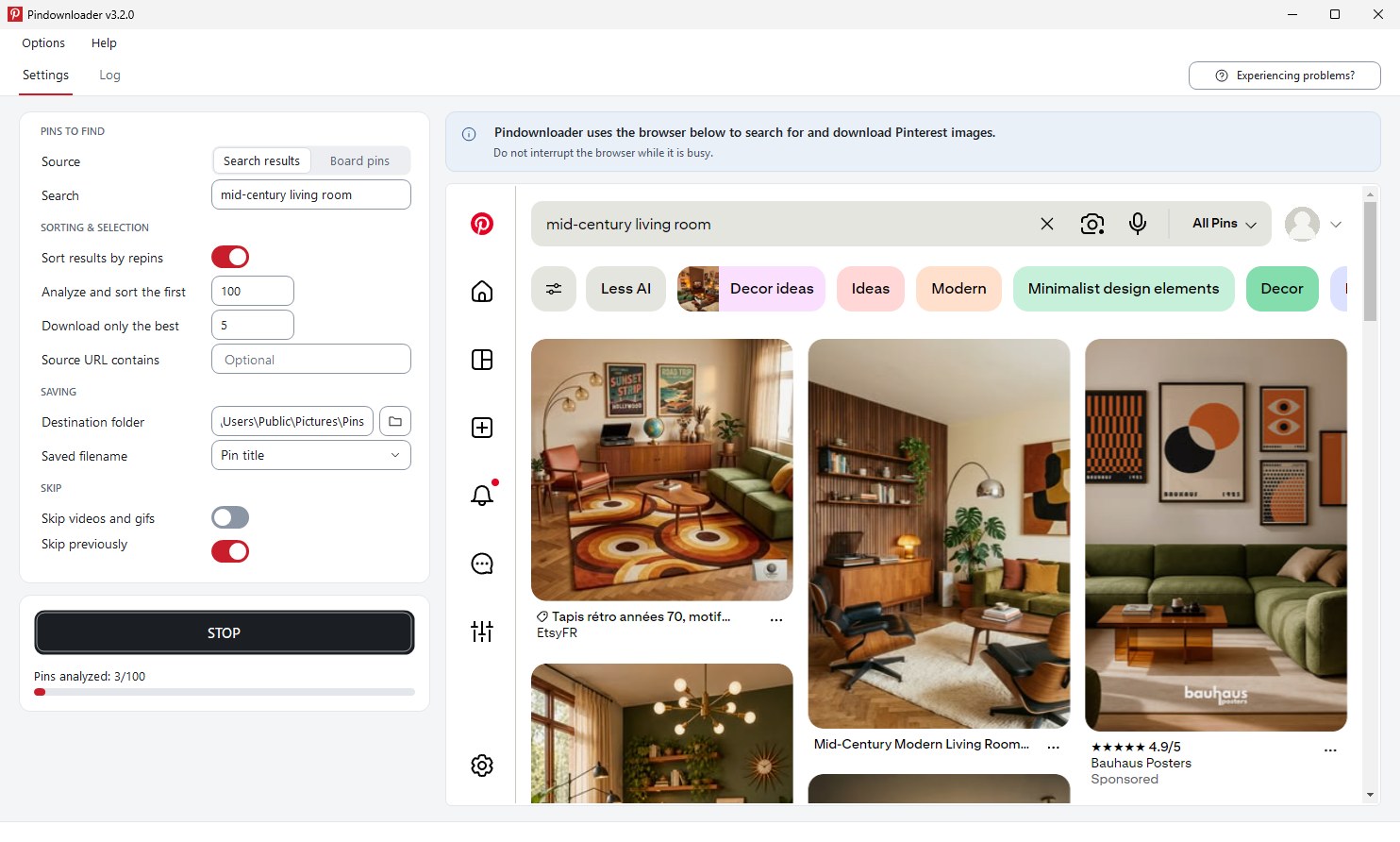
What is Pindownloader?
- $9.95, onceNo subscription, ever
- Lifetime updatesAnd lifetime email support
- Key in your inboxDelivered right after payment
- Try before you buyFree trial, no card needed
A Pinterest image and video downloader that picks the best pins for you
Pindownloader is a desktop app for Windows that downloads images and videos from Pinterest. Back up your own boards or collect the most-saved pins for any keyword, without saving anything by hand. Every setting sits on one screen, with no browser extension and no scripts.
 12345
-
Pick a source
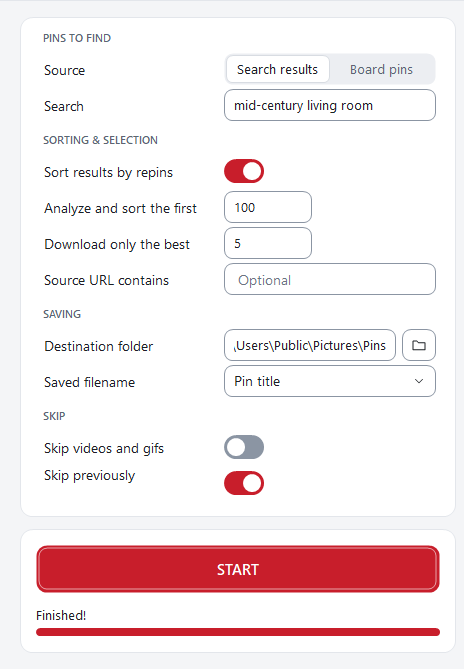
Download images and videos from search results for any keyword, or from a Pinterest board. Paste the board link and go.
-
Sort by repins
Pindownloader checks how often each pin has been saved and puts the popular ones first, so you get the proven images.
-
Analyze many, keep the best
Scan the first 500 pins and keep only the top 5, or the top 100. You decide.
-
Name files your way
Rank after sorting, pin ID, pin title or board name. Skip pins you already have, or skip videos and gifs if you only want pictures.
-
Watch it work
A progress bar and a live log show every step, from the first search to the last saved file.
How it works
From keyword to a folder of pins in three steps
Tell it where to look
Type a search such as “home decor” or “travel ideas”, or paste the link to a board you want to back up.
Set your limits
Choose how many pins to analyze, how many to keep, where to save them and how to name the files.
Press Start
Pindownloader works through Pinterest in its built-in browser and saves the images while you get on with something else.
Why Use PinDownloader?
Built for bulk downloads, not one-by-one saving
Most-saved pins first
Sort by repins and download only the best. You get the images people actually save, not whatever loads first.
Pictures, videos and gifs
Save full-resolution images, plus video pins as MP4 files and animated gifs. Only want pictures? Switch videos and gifs off.
Search results or whole boards
Collect inspiration from any keyword, or back up a full Pinterest board in a few clicks.
Filenames that make sense
Name files by rank, pin ID, pin title or board name, so a folder of 200 pins stays easy to browse.
Skip what you don’t need
Leave out videos and gifs, and skip pins you downloaded before, so repeat runs never fill your disk with duplicates.
A normal Windows program
Install it, run it, done. Designed for non-techies: no browser extension, no command line, and it works on any modern Windows PC.
Who is This For?
Made for people who collect a lot of pins
-
Pinterest creators and influencers
Keep a local backup of your own boards, so your best work is never only on someone else’s server.
-
Social media managers
Pull the top pins for a niche in minutes to plan campaigns and study what performs.
-
Bloggers, designers and content creators
Build mood boards and reference folders from a single search instead of hours of saving.
-
Researchers and trend analysts
Collect the most-saved images for a topic and compare them over time.
Compare
Saving pins by hand vs. Pindownloader
| By hand | Pindownloader | |
|---|---|---|
| Saving 100 pins | Right-click and save, 100 times | One run, while you do something else |
| Videos and gifs | Track down each one and convert streams yourself | Video pins saved as MP4, gifs included |
| Finding the best | Scroll and guess | Ranked by repins automatically |
| File names | Random strings like image_8342.jpg | Rank, pin ID, title or board name |
| Duplicates | Spot them yourself | Previously downloaded pins are skipped |
| Cost | Your time, every time | $9.95 once, lifetime updates |
Our pricing
One price. Yours for life.
No monthly fee and no tiers. Pay once and get every future update, plus support from the person who built it.
- Not sure yet? Install the free trial first. It is fully working, limited to 5 pins at a time.
- Your license key arrives by email the moment you pay.
- Pay with a card, PayPal or cryptocurrency.
- Lifetime license
- Lifetime updates
- Lifetime support
- No subscription fees
- 1 license = 1 computer
Buy now – $9.95PayPal, card or cryptocurrencyDownload free trial first
🔒 Secure checkout · Instant license key delivery
FAQ
Frequently asked questions
What is the difference between the trial and the full license?
The trial works fully but downloads 5 pins at a time. A license removes that limit, so you can analyze and download as many pins as you like.
How do I get my license key?
Right after payment your key appears on screen, and we email it to you with the download link and a PDF invoice. Enter it in the app, restart, and you are done.
Can I download videos and gifs, or only images?
Both. Pindownloader saves images, video pins (as MP4 files) and gifs. If you only want pictures, switch on “Skip videos and gifs” before you press Start.
Can I download a whole Pinterest board?
Yes. Choose “Board pins”, paste the board link and press Start. You can also search by keyword and download the top results instead.
How does sorting by repins work?
Pindownloader analyzes the number of pins you set, for example the first 500, ranks them by how often they were saved, and downloads only the best ones you asked for.
Does it run on Mac?
Pindownloader is a desktop program for Windows PCs.
Can I use one license on two computers?
One license covers one computer. Need another? Buy another license, or email us and we will help.
Do I need a PayPal account to pay by card?
In most countries, no. On the PayPal page choose “Pay with Debit or Credit Card” and check out as a guest. You can also pay with cryptocurrency.
What if Pinterest changes something and it stops working?
Pinterest changes its site from time to time. Updates are free for life, and you can email support@pindownloader.com if something breaks.
Is it okay to download pins?
Pindownloader is meant for personal use such as backing up your own boards and collecting inspiration. Images belong to their creators, so check their rights before you republish anything.
Get started
Stop saving pins one by one
Try Pindownloader free, or get the lifetime license for $9.95 and start collecting the best pins today.
Questions? support@pindownloader.com
Questions or suggestions? Get in touch
We would love to hear from you. Use the form below and we will get back to you as soon as possible, or email support@pindownloader.com.